



Project Overview
Building a custom Content Management System is one of the most effective ways to master the intersection of server-side logic and database management. While heavy-duty platforms like WordPress or Drupal dominate the market, understanding the core architecture of a Content Management System allows you to build lightweight, high-performance web applications tailored to specific needs. A well-designed Content Management System can enhance your workflow and improve overall efficiency.
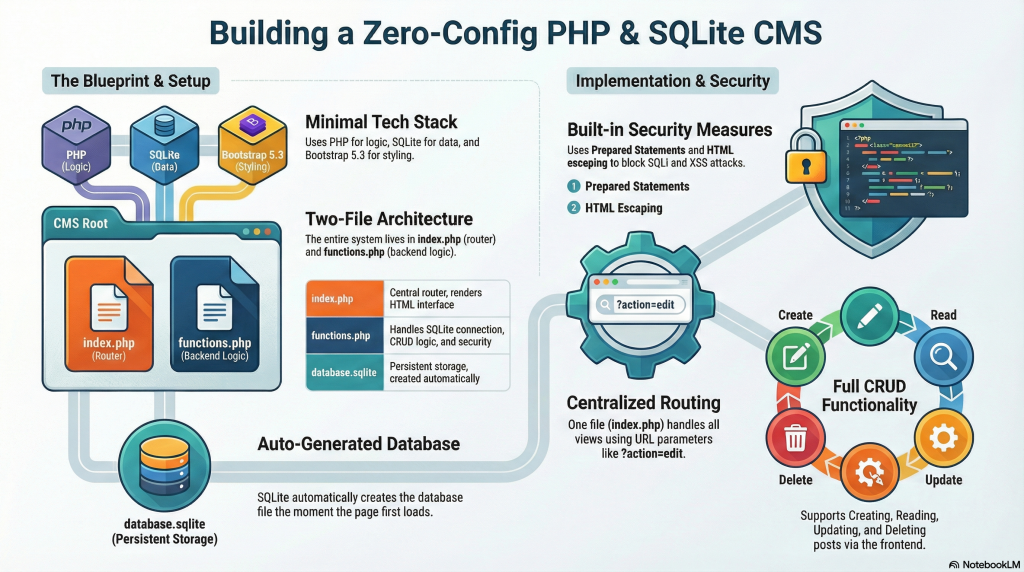
In this guide, we will develop a streamlined Content Management System using PHP and SQLite. This project focuses on the “CRUD” principle—Create, Read, Update, and Delete—which forms the backbone of almost every dynamic website. By utilizing a single-page application structure and a centralized routing system, you’ll learn how to manage content efficiently without the bloat of traditional frameworks.
Additionally, a robust Content Management System provides users with the tools necessary to manage their content effectively, ensuring that updates and changes are made swiftly and accurately. This flexibility is crucial in today’s fast-paced digital landscape.
Our focus will be on building a feature-rich Content Management System that not only meets user needs but also sets the standard for efficiency and performance.

What we will cover:
- Database: SQLite (Auto-generated file).
- Styling: Bootstrap 5.3 (CDN).
- Features: View posts, Add posts, Edit posts, Delete posts. Learn more about CRUD.

1: Setup File Structure
Open your XAMPP directory (usually C:\xampp\htdocs) and create a folder named simple_cms. Inside, create exactly these two files:
This Content Management System will serve as a learning tool, illustrating key concepts in database management and application development.
When you build a Content Management System, you gain insights into how various components work together, from front-end interfaces to back-end logic.
htdocs/
└── simple_cms/
├── functions.php (Database logic & helper functions)
└── index.php (The main interface & router)
2: Create The Backend Logic (functions.php)
This file handles the SQLite connection. It detects if the database exists; if not, it creates the file and the necessary tables automatically.
Copy the following code into functions.php:
<?php
// functions.php

// 1. Database Connection & Auto-Setup
function getDB() {
    $dbFile = __DIR__ . '/database.sqlite';
    $isNew = !file_exists($dbFile);

    try {
        // Connect to SQLite file (creates it if missing)
        $pdo = new PDO("sqlite:" . $dbFile);
        $pdo->setAttribute(PDO::ATTR_ERRMODE, PDO::ERRMODE_EXCEPTION);

        // Create table automatically if this is the first run
        if ($isNew) {
            $sql = "CREATE TABLE IF NOT EXISTS posts (
                        id INTEGER PRIMARY KEY AUTOINCREMENT,
                        title TEXT NOT NULL,
                        content TEXT NOT NULL,
                        created_at DATETIME DEFAULT CURRENT_TIMESTAMP
                    )";
            $pdo->exec($sql);
        }
        return $pdo;
    } catch (PDOException $e) {
        die("Database Error: " . $e->getMessage());
    }
}

// 2. Helper: Clean User Input (Security)
function escape($html) {
    return htmlspecialchars($html, ENT_QUOTES | ENT_HTML5, 'UTF-8');
}

// 3. CRUD Functions

// Get all posts
function getPosts() {
    $pdo = getDB();
    $stmt = $pdo->query("SELECT * FROM posts ORDER BY created_at DESC");
    return $stmt->fetchAll(PDO::FETCH_ASSOC);
}

// Get single post
function getPost($id) {
    $pdo = getDB();
    $stmt = $pdo->prepare("SELECT * FROM posts WHERE id = ?");
    $stmt->execute([$id]);
    return $stmt->fetch(PDO::FETCH_ASSOC);
}

// Create post
function createPost($title, $content) {
    $pdo = getDB();
    $stmt = $pdo->prepare("INSERT INTO posts (title, content) VALUES (?, ?)");
    return $stmt->execute([$title, $content]);
}

// Update post
function updatePost($id, $title, $content) {
    $pdo = getDB();
    $stmt = $pdo->prepare("UPDATE posts SET title = ?, content = ? WHERE id = ?");
    return $stmt->execute([$title, $content, $id]);
}

// Delete post
function deletePost($id) {
    $pdo = getDB();
    $stmt = $pdo->prepare("DELETE FROM posts WHERE id = ?");
    return $stmt->execute([$id]);
}
?>
Implementing a Content Management System allows for greater collaboration among users, enabling them to share insights and updates effortlessly.
3: Create The Frontend & Router (index.php)
This file acts as the controller. It checks what the user wants to do (view, edit, save) and renders the Bootstrap HTML.
Copy the following code into index.php:
<?php
require_once 'functions.php';

// Simple Router based on query string ?action=...
$action = $_GET['action'] ?? 'home';
$id = $_GET['id'] ?? null;

// Handle Form Submissions (POST requests)
if ($_SERVER['REQUEST_METHOD'] === 'POST') {
    $title = $_POST['title'] ?? '';
    $content = $_POST['content'] ?? '';

    if ($action === 'store') {
        createPost($title, $content);
        header('Location: index.php');
        exit;
    } elseif ($action === 'update' && $id) {
        updatePost($id, $title, $content);
        header('Location: index.php');
        exit;
    }
}

// Handle Delete Request
if ($action === 'delete' && $id) {
    deletePost($id);
    header('Location: index.php');
    exit;
}
?>
<!DOCTYPE html>
<html lang="en">
<head>
    <meta charset="UTF-8">
    <meta name="viewport" content="width=device-width, initial-scale=1.0">
    <title>Simple PHP SQLite CMS</title>
    <link href="https://cdn.jsdelivr.net/npm/bootstrap@5.3.0/dist/css/bootstrap.min.css" rel="stylesheet">
</head>
<body class="bg-light">

    <nav class="navbar navbar-expand-lg navbar-dark bg-dark mb-4">
        <div class="container">
            <a class="navbar-brand" href="index.php">ZeroConfig CMS</a>
            <div class="navbar-nav ms-auto">
                <a class="btn btn-primary btn-sm" href="index.php?action=create">+ New Post</a>
            </div>
        </div>
    </nav>

    <div class="container">
        <?php if ($action === 'home'): ?>
            <?php $posts = getPosts(); ?>
            <h1 class="mb-4">Latest Posts</h1>
            <?php if (empty($posts)): ?>
                <div class="alert alert-info">No posts found. Create one!</div>
            <?php else: ?>
                <div class="row">
                    <?php foreach ($posts as $post): ?>
                        <div class="col-md-6 mb-4">
                            <div class="card shadow-sm">
                                <div class="card-body">
                                    <h5 class="card-title"><?= escape($post['title']) ?></h5>
                                    <h6 class="card-subtitle mb-2 text-muted"><?= $post['created_at'] ?></h6>
                                    <p class="card-text"><?= nl2br(escape(substr($post['content'], 0, 100))) ?>...</p>
                                    <a href="index.php?action=edit&id=<?= $post['id'] ?>" class="btn btn-sm btn-outline-secondary">Edit</a>
                                    <a href="index.php?action=delete&id=<?= $post['id'] ?>" class="btn btn-sm btn-outline-danger" onclick="return confirm('Are you sure?')">Delete</a>
                                </div>
                            </div>
                        </div>
                    <?php endforeach; ?>
                </div>
            <?php endif; ?>

        <?php elseif ($action === 'create' || $action === 'edit'): ?>
            <?php
                $post = ($action === 'edit' && $id) ? getPost($id) : null;
                $formAction = $post ? "index.php?action=update&id=$id" : "index.php?action=store";
                $btnText = $post ? "Update Post" : "Create Post";
            ?>
            <div class="card shadow">
                <div class="card-header"><?= $action === 'edit' ? 'Edit Post' : 'Create New Post' ?></div>
                <div class="card-body">
                    <form action="<?= $formAction ?>" method="POST">
                        <div class="mb-3">
                            <label class="form-label">Title</label>
                            <input type="text" name="title" class="form-control" value="<?= $post ? escape($post['title']) : '' ?>" required>
                        </div>
                        <div class="mb-3">
                            <label class="form-label">Content</label>
                            <textarea name="content" class="form-control" rows="5" required><?= $post ? escape($post['content']) : '' ?></textarea>
                        </div>
                        <a href="index.php" class="btn btn-secondary">Cancel</a>
                        <button type="submit" class="btn btn-success"><?= $btnText ?></button>
                    </form>
                </div>
            </div>
        <?php endif; ?>
    </div>

    <script src="https://cdn.jsdelivr.net/npm/bootstrap@5.3.0/dist/js/bootstrap.bundle.min.js"></script>
</body>
</html>
4: How to Run It
- Start XAMPP: Open the XAMPP Control Panel and click “Start” next to Apache. (You do not need MySQL).
- Access the Browser: Open your web browser and navigate to:
http://localhost/simple_cms/ - Automatic Setup: The very first time the page loads, the script will silently create a file named database.sqlite in your folder.
- Use the App: Click “+ New Post” to add content. You will see it appear on the homepage immediately.
Key Technical Details
- SQLite Integration: We used PDO (PHP Data Objects). The line new PDO(“sqlite:” . $dbFile) creates a file-based database instantly.
- Security: We used Prepared Statements ($stmt->prepare) for all SQL queries. This prevents SQL Injection attacks. We also used htmlspecialchars in the escape() function to prevent XSS (Cross-Site Scripting) attacks when displaying text.
- Routing: Instead of creating separate files for every page (e.g., create.php, edit.php), we used a single entry point (index.php) that changes the view based on the URL parameter ?action=.
Conclusion: Putting CRUD into Practice
Understanding the CRUD cycle is the first step toward building a robust Content Management System. This structure is incredibly beneficial for developers looking to create streamlined applications that handle data with precision.
As you dive deeper into the coding aspects, consider how a well-designed Content Management System can transform the way digital content is curated and delivered to your end-users. However, remember that power comes with responsibility; robust security measures are vital in any Content Management System to safeguard sensitive user data from potential vulnerabilities.